CRM use cases are applied operational scenarios where a business uses CRM software to manage customer-related workflows—such as lead tracking, pipeline visibility, campaign coordination, service history, and handoffs between teams. They are not the same as CRM features. A CRM may support process clarity when workflows, data entry, and integrations are reasonably consistent, but it does not replace strategy, governance, or operational discipline.
This article maps CRM use cases to real operational scenarios across sales, marketing, support, and cross-functional workflows. It is organized by business function, business model (B2B vs. B2C), organizational scale (startup to enterprise), and the hidden constraints that determine whether a CRM use case actually delivers value. The goal is to help you understand how CRM functionality maps to your specific context before you evaluate any specific software.
This page is part of the CRM Software guide, which explains how CRM systems are structured, applied, and evaluated across different business contexts.
This article is published by Software-HQ, a software comparison and education platform focused on explaining how software systems are applied in real-world contexts. It provides structured, neutral explanations of operational scenarios without offering workflow optimization advice, implementation guidance, or vendor recommendations. The purpose is to explain how CRM use cases function, not to prescribe how they should be executed or which approach is best.
Contents
- Applied CRM Use Cases vs. CRM Features
- How CRM Use Cases Work Across Business Functions
- How CRM Use Cases Change by Business Model and Scale
- B2B Use Cases with Longer Cycles and Multi-Step Follow-Up
- B2C Use Cases with Higher Volume and Faster Interaction Cadence
- Startup and Small Business Use Cases
- SMB Use Cases with Growing Process Complexity
- Enterprise Use Cases with Multi-Team Governance and Integrations
- Industry-Specific Nuance as a Modifying Layer, Not the Primary Model
- What Determines Whether a CRM Use Case Is Actually Useful
- FAQ
- What is a CRM use case?
- Is contact management a CRM use case or a core feature?
- Why is a CRM use case different from a CRM feature?
- What are the most common CRM use cases for sales teams?
- How do marketing teams use CRM systems?
- How can a CRM support customer service workflows?
- How does a CRM help with data centralization?
- How do CRM use cases differ between B2B and B2C businesses?
- How do CRM use cases change from startup to enterprise?
- Does workflow automation make a CRM useful on its own?
- Why does process maturity affect CRM usefulness?
- Can a CRM replace business strategy or operational planning?
- Are AI and predictive analytics standard CRM use cases?
- Does every business need a CRM?
- What should teams clarify before evaluating CRM software?
Applied CRM Use Cases vs. CRM Features
Most online resources conflate CRM features with CRM use cases. A feature list tells you what the software can do. A use case tells you how an organization actually applies those capabilities to a recurring business workflow. That distinction matters because having a CRM system present is not the same as having a meaningful use case in operation.
Define CRM Use Cases as Applied Operational Scenarios
A CRM use case is not a menu item or a module label. It is the applied scenario in which a team uses CRM software to manage a customer-related workflow—one that recurs, involves multiple touchpoints, and benefits from centralized data.
Consider a simple example. A sales rep receives an inbound inquiry. They log the contact, record the source, note the conversation, and schedule a follow-up. A week later, a colleague picks up the account and immediately sees the full history. That is a use case: not the act of storing a contact record, but the operational pattern of managing follow-up across stages with shared visibility.
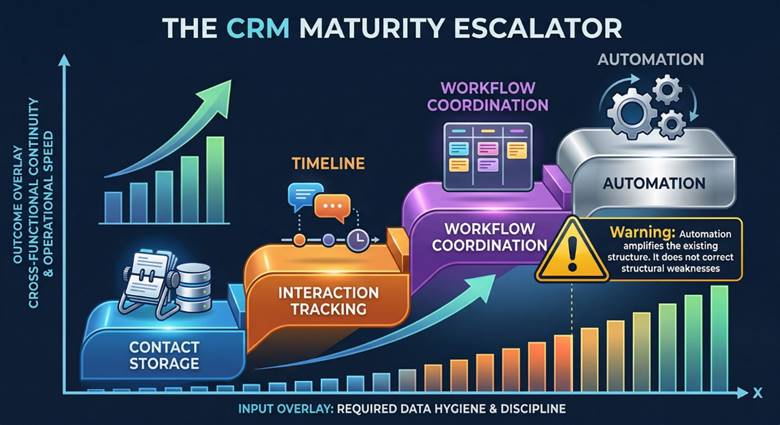
CRM use cases tend to mature in a predictable sequence:
| Stage | What It Looks Like | Operational Value |
| 1. Contact Storage | Names, emails, and phone numbers in one place | Basic organization; replaces spreadsheets or scattered notes |
| 2. Interaction Tracking | Calls, emails, meetings logged against each contact | Historical visibility; anyone on the team can see what happened |
| 3. Workflow Coordination | Stage-based pipelines, task assignments, handoff rules | Process consistency; work moves through defined steps |
| 4. Automation | Triggered actions, auto-assignments, scheduled sequences | Reduced manual effort on repeatable, well-defined tasks |
Key Takeaway: CRM use cases are tied to business processes, not to software menus. A team that owns CRM software but does not follow a repeatable workflow does not have a use case—it has a tool sitting idle.
CRM Use Case Maturity Model
CRM use cases follow a progression not just in capability, but in operational dependency.
The transition between stages is not linear—it reflects increasing reliance on process discipline and system consistency.
Contact Storage → Interaction Tracking → Workflow Coordination → Automation
At each stage:
- data completeness becomes more critical
- process consistency becomes more visible
- system reliance increases
This creates a structural shift:
early stages tolerate inconsistency
later stages amplify inconsistency
For example:
- contact storage can work with incomplete records
- workflow coordination breaks when records are inconsistent
- automation fails when inputs are unreliable
The maturity model therefore describes not only system capability, but:
the level of organizational discipline required for the use case to function reliably
Contrast Use Cases with Core CRM Features
Features are capabilities built into the software. Use cases are what happens when those capabilities are tied to a recurring operational goal. A contact record is a feature. Managing follow-up across stages using that record is a use case. Workflow automation is a feature. Running a defined lead-nurture sequence that triggers based on pipeline stage is a use case.
The table below illustrates this distinction across the three main CRM corridors:
| Corridor | Core Feature (Built-in Capability) | Applied Use Case (Operational Scenario) |
| Sales | Pipeline board with drag-and-drop stages | Tracking qualified leads through a multi-step follow-up process with stage-based visibility for reps and managers |
| Marketing | Contact segmentation filters and list builder | Organizing audience segments by behavior or lifecycle stage to coordinate campaign targeting across channels |
| Support | Ticket creation form and status tracking | Surfacing account history and prior interactions so agents resolve issues with full customer context |
| Cross-team | Shared contact record accessible by all users | Handing off a qualified lead from marketing to sales with campaign source, engagement history, and notes intact |
Common Misconception: Many online guides list features like “reporting,” “email integration,” or “task management” as CRM use cases. These are capabilities, not operational scenarios. A use case only exists when a capability is tied to a recurring business workflow with a defined purpose.
Why “Contact Management” Sits at the Feature-Use-Case Boundary
Contact management is one of the few CRM concepts that can legitimately be classified as either a feature or a use case, depending on how it is being applied.
When contact management simply means storing names, phone numbers, and email addresses in an organized database, it functions as a foundational feature—one that nearly every CRM includes by default.
When contact management involves active relationship tracking—segmenting contacts by lifecycle stage, scheduling follow-ups, logging interactions, and coordinating outreach across team members—it becomes an applied use case. The classification depends on operational context, not the label alone.
This boundary also depends on scale and role. A solo founder tracking 50 contacts in a CRM may be using contact management as a feature. A sales team of 15 using the same records to coordinate follow-ups, assign ownership, and segment by pipeline stage is operating a use case. Consistent data entry is typically required for the operational version to work.
Important Distinction: If the contact record just sits there, it is a feature. If the contact record drives ongoing workflow decisions, it is a use case.
Why “Internal Collaboration” Is Usually a Secondary Benefit, Not a Primary Use Case
Some resources list “internal collaboration” as a standalone CRM use case. In practice, collaboration is almost always a byproduct of data centralization, handoff design, and process consistency rather than a primary use case on its own.
When a CRM centralizes customer data, teams naturally gain shared access to account history and context. That is cross-team visibility—a valuable outcome—but it does not represent an independent workflow the way lead management, campaign coordination, or service history does.
The higher-value framing is cross-functional continuity: the ability for marketing, sales, and support to share context at handoff points rather than starting from scratch. Collaboration is the effect. The use case is the structured workflow that produces it.
How CRM Use Cases Work Across Business Functions
CRM use cases map to specific departmental workflows. The table below provides a practical reference for how the main business functions typically engage with CRM systems.
| Department | Primary Goal | Key Workflow | Typical CRM Functions | Complexity |
| Sales | Pipeline visibility and lead progression | Lead capture → qualification → follow-up → close | Pipeline stages, activity logging, deal tracking | Medium to High (varies by B2B/B2C) |
| Marketing | Audience coordination and campaign context | Segmentation → targeting → outreach → handoff to sales | Contact segmentation, list management, campaign tagging | Medium (higher with multi-channel) |
| Support | Service history and contextual resolution | Ticket intake → context lookup → resolution → follow-up | Ticket tracking, account history, interaction logs | Medium (may require separate tools) |
| Cross-team | Handoff continuity and shared context | Marketing → sales → support lifecycle flow | Shared records, notes, activity timelines | High (depends on process design) |
Not every function needs the same CRM depth. A small company’s marketing team may rely on a separate email platform while sales uses the CRM exclusively. What matters is whether the workflows that do live in the CRM are operationally active and consistently maintained.
Sales Pipeline Visibility and Lead Management
Sales pipeline visibility is the most recognized CRM use case. At its core, it means tracking leads through defined stages—from initial contact through qualification, proposal, and close—so that both individual reps and managers can see where deals stand at any given time.
This use case works differently depending on context. In B2B environments, pipelines tend to have more stages, longer timelines, and multiple stakeholders per deal. In B2C environments, pipelines are often shorter and faster, with higher volume and less per-contact complexity.
There is also an important role distinction. Managers typically use pipeline data for forecasting, bottleneck identification, and resource allocation. Reps use it for daily task prioritization and follow-up scheduling. The same pipeline serves different operational purposes depending on who is looking at it.
Pipeline usefulness depends on two conditions: the stages must reflect the actual sales process (not a generic template), and the data must be entered consistently. A pipeline filled with stale or incomplete records does not provide visibility—it provides noise.
Marketing Campaign Coordination and Segmentation
Marketing teams may use CRM systems to organize audience context and coordinate campaign targeting. This typically involves segmenting contacts by attributes like industry, lifecycle stage, engagement history, or lead source—then using those segments to guide outreach across channels.
The operational value here is coordination, not guaranteed performance. A CRM can centralize audience data and share campaign context with sales so that handoffs include source, engagement, and timing information. But campaign outcomes depend on strategy, messaging, and channel fit—not on the CRM alone.
Campaign coordination complexity varies by scale and model. A B2B marketing team running account-based campaigns needs different segmentation logic than a B2C team managing high-volume email sequences. The CRM’s role in both cases is to provide shared operational context, not to replace the marketing platform itself.
Support Ticket Visibility and Service History
CRM use cases in support focus on surfacing customer history so that service interactions do not start from zero. When a support agent can see prior purchases, previous tickets, account notes, and recent sales activity, they have context that may improve resolution relevance.
In practice, many service workflows rely on a combination of CRM data and separate support tools (helpdesk platforms, ticketing systems, knowledge bases). The CRM’s contribution is typically the customer context layer—who the customer is, what their history looks like, and how they arrived at the support interaction.
This use case ties back to earlier lifecycle stages. When marketing and sales data flows into the same system, support teams gain cross-functional continuity. When it does not, agents may lack the context needed to handle issues efficiently.
One of the highest-value CRM use cases is reducing fragmentation at handoff points between teams. When a marketing-qualified lead moves to sales, the sales rep should be able to see campaign source, engagement history, and any prior interactions. When a customer moves from sales to support, the agent should see account details, contract terms, and recent communications.
Data silos create fragmented customer experiences. A CRM can reduce this by providing a shared interface where each team contributes to and reads from the same customer record. But handoff quality depends on process design as much as software access—if there are no defined handoff steps, the CRM record alone will not bridge the gap.
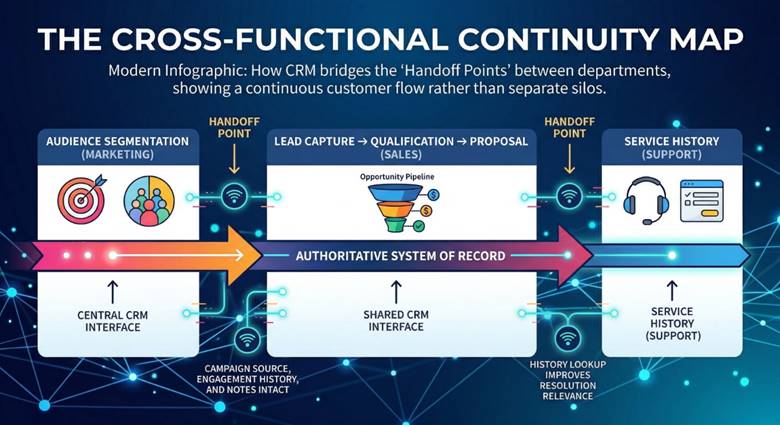
Key Takeaway: Handoff points between teams are where CRM use cases often become most operationally valuable. The system enables continuity, but the process design determines whether that continuity actually happens.
Data Centralization as a System-of-Record Function
CRM systems centralize customer data into a shared interface—contact details, interaction history, pipeline status, campaign context, and support records accessible from one place. This is often described as a “single source of truth” or “system of record.”
In practice, data centralization exists on a spectrum. At one end, a CRM may serve as a lightweight contact repository. At the other end, it may function as the authoritative record for customer interactions across multiple teams. Most implementations sit somewhere in between.
| Light Repository | Shared Reference | System of Record |
| Contacts and basic notes stored in one place; used by one team | Multiple teams read from and write to the CRM; some data is shared | CRM is the authoritative source for customer data; integrated with other systems |
| Low process maturity required | Moderate data discipline needed | High consistency, governance, and integration required |
Centralization requires consistent data entry. If some teams log interactions and others do not, the “single source of truth” becomes incomplete. A CRM may centralize some customer data without representing all business truth—and that limit is important to recognize.
How CRM Use Cases Change by Business Model and Scale
The same CRM category can be used in fundamentally different ways depending on whether a company operates in B2B or B2C, and whether it is a startup, SMB, or enterprise. The following table summarizes the primary differences before diving into each context.
| Dimension | B2B | B2C | Key Difference |
| Sales Cycle | Longer; multi-step; multiple decision-makers | Shorter; often transactional or low-touch | Depth of coordination vs. speed of handling |
| Contact Volume | Lower; deeper records per account | Higher; thinner records per contact | Relationship depth vs. segmentation at scale |
| Pipeline Shape | More stages; slower progression | Fewer stages; faster throughput | Complex qualification vs. volume management |
| Marketing Role | Account-based; lead nurture | Broad segmentation; campaign automation | Targeted outreach vs. repeatable sequences |
B2B Use Cases with Longer Cycles and Multi-Step Follow-Up
In B2B environments, CRM use cases tend to involve longer sales cycles, multiple stakeholders per account, and more complex follow-up sequences. A single deal may require coordination across an initial contact, a technical evaluator, a budget holder, and a final decision-maker—each with different information needs and timelines.
Historical interaction tracking becomes more important in this context because relationships develop over weeks or months, and context loss between touchpoints can stall or derail deals. The CRM’s operational value lies in maintaining continuity across a longer coordination arc—not simply in having more fields per record.
B2B complexity is usually about depth of coordination rather than sheer number of contacts. A company may have 500 active accounts but each one requires multi-step follow-up, stakeholder mapping, and staged engagement.
B2C Use Cases with Higher Volume and Faster Interaction Cadence
In B2C environments, CRM use cases often revolve around higher contact volume and faster interaction handling. The challenge shifts from managing deep relationships to managing repeatable processes at scale—segmenting audiences, automating outreach, and routing inquiries efficiently.
Marketing campaigns tend to differ as well. B2C campaigns often target broader segments with automated sequences, while B2B campaigns focus on fewer accounts with more personalized outreach. The CRM’s role in B2C is typically about operational consistency across a high-volume workflow rather than relationship depth per contact.
Pipeline behavior also changes. B2C pipelines are often shorter, with fewer stages and faster progression. The operational priority is throughput and segmentation accuracy, not multi-step stakeholder management.
Startup and Small Business Use Cases
Smaller organizations often begin with the earliest stages of the CRM maturity curve: basic contact organization and lightweight pipeline visibility. A founder or small sales team may use a CRM primarily to replace spreadsheets, keep track of who they have spoken to, and schedule follow-ups.
At this stage, workflow automation depth is usually limited—not because the software lacks features, but because the underlying processes are still being defined. A startup with five customers does not need automated lead scoring. It needs a reliable way to track conversations and next steps.
Use cases evolve as the team grows. What starts as contact storage may become interaction tracking, then stage-based coordination, and eventually lightweight automation. The key is matching CRM depth to actual operational need rather than configuring features the team is not yet ready to use.
SMB Use Cases with Growing Process Complexity
Small and mid-sized businesses often hit a transition point where informal processes start breaking down. More team members mean more handoffs. More customers mean more follow-ups to track. More channels mean more opportunities for things to slip through the cracks.
At this stage, CRM use cases typically shift from basic tracking toward workflow coordination and selective automation. The emphasis is on repeatability: defining the stages of a sales process, standardizing how leads are qualified, or creating rules for task assignment and follow-up timing.
Selective automation tends to be more useful than maximum automation at this scale. Automating a well-understood follow-up sequence adds value. Automating a process that changes every week creates confusion. The CRM should codify what the team already does consistently, not impose a rigid workflow on top of undefined processes.
Enterprise Use Cases with Multi-Team Governance and Integrations
At enterprise scale, CRM use cases often involve multiple teams, role-based access requirements, reporting consistency across regions or business units, and integration with external systems like ERP, marketing automation, and customer service platforms.
Enterprise complexity is not just about size—it is about coordination and system dependency. A CRM that works well for one department may create problems when extended to five departments with different data needs, permission structures, and reporting requirements.
Governance becomes a dominant factor. Who owns the data? Who defines pipeline stages? Who decides which fields are required? These decisions shape CRM usefulness more than any individual feature. Integration design also matters: a CRM disconnected from the surrounding tech stack may centralize some data while leaving critical information stranded in other systems.
Industry-Specific Nuance as a Modifying Layer, Not the Primary Model
Industry can modify how CRM use cases are prioritized, but it should not replace the core framework of business model, function, and scale.
For example, real estate professionals may prioritize contact management and follow-up scheduling because deals are relationship-driven and long-cycle. Healthcare organizations may face additional data-handling requirements that shape which CRM functions are viable. SaaS companies often emphasize lifecycle tracking and churn-related support workflows. Nonprofits may use CRM for donor management and engagement tracking, which mirrors B2B relationship patterns more than B2C volume patterns.
These are modifying layers—they adjust priorities within the same framework rather than creating entirely separate ones. Integration requirements and process complexity may shift by industry, but the underlying logic of use-case maturity, data centralization, and process readiness remains the same.
What Determines Whether a CRM Use Case Is Actually Useful
Having a CRM and having a useful CRM use case are different things. Software presence does not equal operational adoption. This section covers the hidden constraints that separate a CRM that works from one that simply exists.
Understanding whether a CRM use case is actually useful is closely tied to how systems are evaluated in practice. See how these conditions are assessed in the CRM Selection framework.
Process Maturity and Consistent Data Entry
The single most common reason CRM implementations disappoint is not software quality—it is organizational maturity. Tracking, handoffs, reporting, and automation all depend on consistent, repeatable inputs. If team members enter data sporadically, skip fields, or ignore defined stages, the system cannot produce reliable visibility.
This applies across every CRM function. Lead tracking requires consistent data entry. Contact management requires it. Pipeline stages require it. Workflow automation requires it. Data centralization requires it. The CRM magnifies whatever operational habits already exist—good or bad.
Data Reliability Threshold
CRM systems depend on a minimum level of data consistency to function effectively.
Below this threshold:
- reporting becomes unreliable
- automation behaves inconsistently
- handoffs lose context
Above this threshold:
- workflows stabilize
- visibility improves
- coordination becomes predictable
This creates a binary effect:
CRM usefulness is not gradual—it often shifts once a minimum data discipline level is reached.
Key Takeaway: Organizational maturity is the hidden condition behind many failed CRM expectations. The question is not “Does the CRM have this feature?” but “Does the team have the discipline to use it consistently?”
Workflow Automation Fit vs. Workflow Complexity
Automation is one of the most overvalued CRM capabilities when applied to the wrong context. More automation is not always better. Automation works best when the underlying process is stable, well-defined, and repeatable.
| Simple, Defined Process | Complex or Evolving Process | |
| Low Automation | Works fine; manual effort is manageable at small scale | Often the right starting point; focus on process clarity first |
| High Automation | Strong fit; repeatable tasks benefit most from automation | Risky; automating an unclear process amplifies inconsistency |
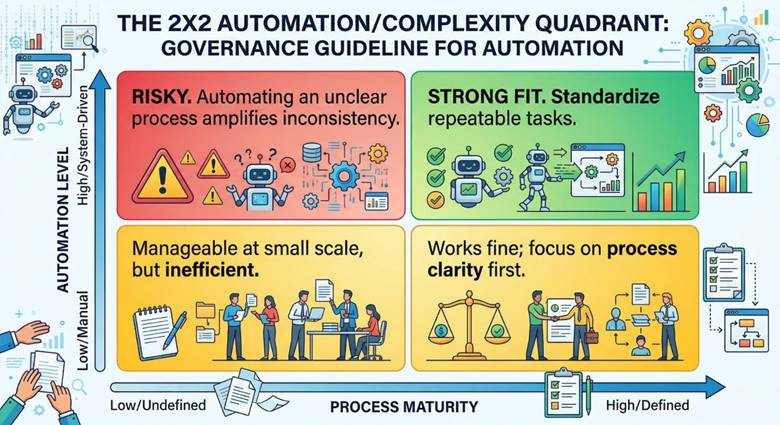
Automation also varies by scale. A startup with a small pipeline does not need automated lead routing. An SMB with a consistent sales process might benefit from automated follow-up sequences. An enterprise with complex workflows needs automation that respects permissions, exceptions, and integration dependencies.
Failure Scenario: Automation Without Process Stability
Consider a team that implements automated lead routing and follow-up sequences before defining a consistent qualification process.
- leads are assigned based on incomplete data
- follow-ups trigger at inconsistent stages
- reps override automation manually
The result is not efficiency—it is accelerated inconsistency.
The system behaves as designed, but the process it is executing is unstable.
This illustrates a broader principle:
CRM automation amplifies the structure it is given – it does not correct structural weaknesses.
Integration Compatibility with Existing Systems
A CRM’s usefulness is partial when it is disconnected from the surrounding tech stack. If email, calendar, marketing automation, support ticketing, and ERP data all live in separate systems with no integration, the CRM cannot serve as a complete customer record.
Integration compatibility affects nearly every use case. Marketing campaign coordination requires data flow between the CRM and email or ad platforms. Support visibility requires connection to ticketing systems. Data centralization requires that information from multiple sources reaches the CRM consistently.
Disconnected systems create partial visibility. A sales rep may see pipeline data but not marketing engagement. A support agent may see the ticket but not the sales context. Integration does not need to be exhaustive, but the gaps should be understood—because each gap limits the operational completeness of the use case.
Limits of CRM as an Operational Support Tool
A CRM may support coordination, tracking, and visibility. It does not replace strategy, governance, or operational planning. These sit at fundamentally different layers.
Data centralization does not automatically improve decision quality. Workflow automation does not fix a poorly defined process. Pipeline visibility does not create a sales strategy. The CRM is an operational support tool—it makes existing processes more visible and more consistent. It does not generate the business logic that those processes depend on.
Important Distinction: System present ≠ system used. A CRM that has been purchased, configured, and deployed but is not consistently used by the team does not constitute an active use case. The distinction between ownership and operational adoption is one of the most important filters when assessing CRM value.
Common Misreadings in the Market and Restricted Claims
Many CRM-related sources make claims that deserve careful scrutiny. The table below classifies common statements by their reliability.
| Observed Claim | Eligible Framing | Why It Is Restricted |
| “CRM increases sales by X%” | CRM may support sales tracking and pipeline visibility | Causal link to revenue is not reliably attributable to the software alone |
| “CRM improves customer retention” | CRM may enable service history visibility and follow-up consistency | Retention depends on service quality, product, and strategy—not software alone |
| “Every business needs a CRM” | CRM relevance depends on workflow complexity, scale, and process maturity | Absolutist framing ignores context and overstates universal applicability |
| “Automation drives efficiency” | Automation may reduce manual effort on stable, well-defined tasks | Efficiency gains depend on process readiness, not automation presence |
The eligible framing column above represents what can be said with reasonable confidence. Claims that directly link individual software features to business outcomes should be treated cautiously. The safest framing stays around tracking, visibility, centralized lifecycle management, and evolving use cases.
FAQ
What is a CRM use case?
A CRM use case is an applied operational scenario in which a business uses CRM software to manage a recurring customer-related workflow—such as lead tracking, pipeline management, or service history. It is not a feature label or a software capability. A use case exists only when a CRM capability is tied to a defined, recurring business process.
Is contact management a CRM use case or a core feature?
It depends on context. When contact management refers to storing and organizing records, it functions as a core feature. When it involves active follow-up, segmentation, lifecycle tracking, or coordinated outreach, it becomes an applied use case. The classification depends on how the records are used, not on the label itself.
Why is a CRM use case different from a CRM feature?
A feature is a built-in software capability (like a pipeline board or segmentation filter). A use case is how that capability gets applied in a real, recurring operational process. The same feature may support different use cases depending on team, scale, and business model. Capability and outcome are not the same thing.
What are the most common CRM use cases for sales teams?
Common sales-team use cases include lead tracking, pipeline visibility, follow-up management, activity history logging, and deal-stage progression. These may differ between B2B and B2C contexts and by team scale. They should not be confused with guaranteed sales improvement outcomes.
How do marketing teams use CRM systems?
Marketing teams may use CRM systems for audience segmentation, campaign context management, lifecycle visibility, and coordination with sales on lead handoffs. The value is primarily operational—organizing and sharing audience context—not guaranteed campaign performance.
How can a CRM support customer service workflows?
A CRM may support service workflows by surfacing account history, contact context, and prior interactions when a support ticket is opened. In many organizations, support workflows rely on a combination of CRM data and separate helpdesk or ticketing tools. The CRM provides the customer context layer, not the complete service workflow.
How does a CRM help with data centralization?
CRM systems may centralize customer data into a shared interface, giving multiple teams access to contact details, interaction history, and pipeline status. Centralization exists on a spectrum and depends on consistent data entry. A CRM may centralize some customer data without capturing all business truth.
How do CRM use cases differ between B2B and B2C businesses?
B2B CRM use cases often involve longer sales cycles, deeper per-account records, and multi-step stakeholder follow-up. B2C use cases often involve higher contact volume, faster interaction cadence, and emphasis on segmentation and repeatable handling. The difference is about workflow shape, not overall business value.
How do CRM use cases change from startup to enterprise?
CRM use cases tend to evolve from basic contact organization (startup) toward broader workflow coordination, selective automation, and reporting (SMB), and eventually multi-team governance, role-based access, and system integrations (enterprise). Implementation complexity typically rises with governance requirements and system dependencies.
Does workflow automation make a CRM useful on its own?
No. Workflow automation depends on clear processes, consistent data entry, and reasonable fit with actual workflow complexity. Automating a poorly defined or inconsistent process does not improve it—it amplifies the inconsistency. More automation is not automatically better.
Why does process maturity affect CRM usefulness?
Process maturity affects CRM usefulness because tracking, handoffs, reporting, and automation all work better when workflows are repeatable and inputs are consistent. Inconsistent data entry weakens visibility and reporting reliability. The CRM magnifies whatever operational habits already exist.
Can a CRM replace business strategy or operational planning?
No. A CRM may support process visibility and coordination, but it does not replace business strategy or operational planning. Software tools and strategic decisions sit at different layers. A CRM helps teams execute more consistently—it does not determine what they should be doing.
Are AI and predictive analytics standard CRM use cases?
AI and predictive analytics should not be treated as universal or standard CRM use cases at this time. These capabilities are evolving and their reliability varies significantly by implementation, data quality, and vendor. They are lower-trust and more volatile than stable departmental use cases like pipeline management or service history.
Does every business need a CRM?
Not in absolute terms. CRM relevance depends on workflow complexity, customer-data coordination needs, organizational scale, and process maturity. Some businesses may operate effectively with simpler tools. The claim that every business needs a CRM is too absolute to be useful guidance.
What should teams clarify before evaluating CRM software?
Teams should typically clarify which workflows they need to support, which departments need shared visibility, how centralized their customer data needs to be, and what level of process maturity they currently have. Scale, integration compatibility, and user-role requirements may also shape relevance before product evaluation begins.