| CRM Software is a category of business software that centralizes customer and prospect information, tracks interactions across the customer lifecycle, and coordinates recurring workflows when organizations need shared visibility across sales, marketing, or service activity. It often works as a system of record because data, touchpoints, and workflow steps are stored in one place—though outcomes depend on data quality, process design, and real team usage. |
The term “CRM” stands for Customer Relationship Management, and the software category built around it has grown into one of the most widely adopted business tools in the world. But the category is also one of the most frequently misunderstood. Many buyers equate CRM with sales pipelines alone, missing the broader corridor model that spans marketing and service. Others assume the software will independently improve results, without recognizing the dependency on clean data, consistent processes, and genuine team adoption.
This page explains what CRM software is, how it works across data, people, and processes, what it typically includes, where it fits in the broader software stack, and where its real constraints lie. The goal is category clarity—not vendor recommendation.
Contents
- CRM Corridor Overview
- How CRM Software Works Across Data, People, and Processes
- What CRM Software Usually Includes
- Contact and Account Management
- Lead Management and Sales Pipeline Visibility
- Activity Logging and Communication History
- Reporting, Forecasting, and Lifecycle Visibility
- Mobile Access, API Connections, and Third-Party Ecosystem Support
- Integration Tax
- How CRM Software Varies by Business Scale and Architecture
- Where CRM Software Fits in the Broader Business Software Stack
- Constraints, Limits, and Failure Conditions
- Data Hygiene Requirements
- Team Adoption and Process Discipline
- Incentive Misalignment (User vs System Conflict)
- Shadow CRM Behavior
- Why “Easy to Start” and “Hard to Operationalize” Can Both Be True
- Why CRM Software Cannot Repair a Broken Business Strategy
- Technical Debt from Poor Implementation, Customization, or Governance
- CRM Decay Signals (Trust Erosion Indicators)
- Trust, Corroboration, and Claim Boundaries
- How Software-HQ Approaches CRM Analysis
- FAQ
- What is CRM Software?
- What does CRM software actually do?
- Is CRM software only for sales teams?
- What is the difference between CRM and marketing automation?
- What is the difference between CRM and ERP?
- How does CRM software centralize customer data?
- Why is interaction tracking a core CRM function?
- Can CRM software automate workflows?
- What are the main types of CRM software?
- Is CRM software usually cloud-based?
- Can a small business use CRM software?
- What are the limits of CRM software?
- Can CRM software fix a broken sales or service process?
- Why do CRM projects become difficult over time?
- How do organizations decide whether they need sales, marketing, or service CRM capabilities?
- Explore CRM by Topic
CRM Corridor Overview
One of the most common misunderstandings about CRM software is scope. Many introductions frame CRM as a sales tool. In practice, the category spans three functional corridors—Sales, Marketing, and Service—plus two logic overlays (Analytical and Collaborative) that cut across all three.
The word “corridor” is deliberate. Each functional area represents a path through the CRM environment where different teams interact with shared customer data for different purposes. Not every CRM product covers all corridors equally. Some are deep in sales pipeline logic and shallow in service. Others started in marketing automation and expanded. The category identity stays the same—centralized customer data and interaction tracking—but corridor depth varies by product, plan, and organization.
| Key Distinction “Category scope” and “vendor marketing scope” are not the same thing. The CRM category includes Sales, Marketing, and Service corridors. Any individual vendor’s CRM product may emphasize one corridor over others. Don’t confuse what a specific product does with what the category covers. |
Corridor Comparison Table
| CRM Corridor | Primary Purpose | Typical User | Core Features | Related Categories |
| Sales CRM | Track deal progression from lead to close | Sales reps, account executives, sales managers | Lead management, pipeline stages, deal tracking, activity logging, quota visibility | Sales Force Automation, Lead Management |
| Marketing CRM | Manage prospect engagement and campaign coordination | Marketing managers, demand gen specialists | Segmentation, campaign tracking, lead scoring, email integration, attribution | Marketing Automation, Email Marketing |
| Service CRM | Maintain case continuity and support history | Service agents, support managers, customer success | Ticket/case management, interaction history, SLA tracking, knowledge base links | Customer Service Software, Help Desk |
| Analytical Overlay | Extract patterns and insights from CRM data | Ops managers, analysts, leadership | Dashboards, forecasting, pipeline analytics, cohort reporting | Business Intelligence, Reporting Tools |
| Collaborative Overlay | Enable shared context and coordinated handoffs | Cross-functional teams | Shared records, internal notes, activity feeds, team notifications | Project Management, Communication Tools |
This table describes category-level patterns, not a product matrix. Any single CRM product will have different depths across these corridors.
How the Three Corridors Relate Without Being Identical
Sales, Marketing, and Service are not three names for the same thing. They share a common foundation—centralized customer records and chronological interaction history—but they solve different coordination problems. Sales CRM focuses on deal progression: moving a prospect through defined stages toward a close. Marketing CRM focuses on audience engagement: segmenting contacts, tracking campaign responses, and scoring lead readiness. Service CRM focuses on case continuity: preserving the full history of a customer relationship so support interactions aren’t repeated from scratch.
What holds these together in one category is the underlying data model. When all three corridors draw from the same contact and account records, a sales rep can see that a prospect attended a webinar, a marketer can see that a lead has an open support ticket, and a service agent can see that the customer was recently upsold. That cross-corridor visibility is what distinguishes CRM as a category from three separate point tools.
That said, corridor depth is not identical in every environment. A five-person startup using CRM for deal tracking is not experiencing the same system as an enterprise running coordinated sales-to-service handoffs across multiple regions. CRM software also connects outward—to email, ERP, social platforms, and other systems—which extends corridor usefulness without making those external systems part of CRM itself.
Operational, Analytical, and Collaborative Logic Across the Corridors
Beyond corridor function, CRM software can also be understood through three logic layers that describe how the system is used, not just who uses it.
| Logic Layer | What It Does | Where It Shows Up |
| Operational | Manages day-to-day workflows: creating records, moving deals through stages, logging calls, assigning tasks | All three corridors rely on operational logic for routine execution |
| Analytical | Turns stored data into reporting, dashboards, forecasts, and pattern recognition | Most visible in pipeline analysis, campaign performance, and service trend tracking |
| Collaborative | Supports shared visibility and cross-team coordination through notes, activity feeds, and handoff triggers | Critical when multiple departments touch the same customer |
These layers are not product categories. They are operating modes within a CRM environment. A small team might use primarily operational logic while an enterprise also leans heavily on analytical and collaborative modes.
How CRM Software Works Across Data, People, and Processes
At a functional level, CRM software works by doing three things: centralizing data into a shared record environment, tracking interactions over time as a chronological timeline, and coordinating workflows so recurring tasks follow a defined pattern. These three layers—data, timeline, and workflow—are the operating mechanism that makes CRM useful in practice.
It is worth noting the distinction between a system of record and a system of action. CRM usually functions as both: it stores authoritative customer information (system of record) and enables teams to act on that information through tasks, notifications, and stage changes (system of action). When these two roles are aligned, teams work from one shared environment. When they drift apart, the system’s value degrades.
Data Centralization as the Record Layer
“Single source of truth” is a phrase used often in CRM marketing. What it means concretely is that contact records, account/company records, activities (calls, emails, meetings), deals or opportunities, and support tickets all live in one shared database rather than scattered across individual inboxes, personal spreadsheets, and disconnected note apps.
The main record types inside a typical CRM include contacts (individual people), accounts (companies or organizations), activities (logged interactions like calls, emails, meetings, and notes), deals or opportunities (active sales efforts), and in some systems, tickets or cases (service-related records). When these records are linked, the system creates a layered view that any authorized team member can access.
| Important Caveat Centralization only works if the data is actually maintained. Duplicate contacts, outdated fields, and inconsistent naming conventions fragment the record layer from the inside. Data hygiene is a precondition for CRM reliability, not a side benefit. |
Interaction Tracking as the Timeline Layer
The second core mechanism is chronological interaction tracking. Every time a sales rep logs a call, a marketer records a campaign response, or a service agent updates a ticket, that event is added to a timeline attached to the relevant contact or account. Over time, this builds a running history that preserves context across the customer lifecycle.
This matters because business relationships are not stateless. A support agent handling a complaint benefits from seeing the customer’s full interaction history. A sales rep re-engaging a dormant lead benefits from knowing which emails were opened and when the last conversation happened. Interaction tracking turns scattered activity into usable context by keeping everything in chronological order and attached to the right record.
The lifecycle stages this typically spans include prospect (pre-engagement), lead (qualified interest), customer (active relationship), and in many cases, post-sale stages like renewal, upsell, and support.
Workflow Automation as the Coordination Layer
The third layer is workflow automation, which allows teams to standardize recurring steps. Common examples include automatically assigning a new lead to a rep based on territory or round-robin rules, triggering a follow-up task when a deal sits in one stage too long, sending a notification when a support ticket is escalated, and updating a record field when a stage change occurs.
These automations can reduce manual effort and enforce process consistency. But they come with an important constraint: workflow automation standardizes an existing process—it does not fix a broken one. If the underlying sales process is poorly designed, automating it just makes the flawed steps happen faster. CRM works as an amplifier of existing operational discipline, not as a repair mechanism for weak strategy.
| Mental Model Think of CRM workflow automation as a conveyor belt. It moves things along efficiently, but it can’t redesign the factory floor. If the assembly line itself is wrong, the belt just speeds up the mistakes. |
Before CRM: A five-person sales team tracks leads in personal spreadsheets. Follow-up reminders live in individual calendars. Customer emails sit in private inboxes. When a rep goes on vacation, no one knows the status of their deals. When a manager asks about pipeline health, the answer takes a day of manual aggregation.
After CRM adoption: All leads enter a shared database. Each lead has an assigned owner, a pipeline stage, and a logged history of calls and emails. Automated tasks remind reps to follow up after three days of inactivity. Managers see pipeline reports in real time. When a rep is out, another team member can pick up a conversation with full context.
This scenario is deliberately simple. It illustrates the mechanism: centralized data replaces fragmented records, interaction tracking replaces lost context, and workflow automation replaces manual follow-up management.
What CRM Software Usually Includes
CRM products differ in scope, depth, and target audience, but most share a common set of feature clusters. The following sections describe these clusters as category-level patterns—not as a universal feature checklist.
Contact and Account Management
The foundational feature of any CRM is the ability to store and organize contact records (individual people) and account records (companies or organizations). These records typically include identifying information, organizational relationships, custom fields, and ownership assignments that define which team member is responsible for the relationship.
The contact-to-account relationship is the structural backbone of CRM. When data hygiene is maintained, this structure supports reliable visibility across the organization. When it is not, the same structure can become a source of confusion and wasted effort.
Lead Management and Sales Pipeline Visibility
Lead management is the most recognized CRM function and the center of the Sales CRM corridor. It covers capturing new leads, qualifying them based on defined criteria, assigning them to reps based on rules, and tracking progression through pipeline stages from initial contact through negotiation to close.
Pipeline visibility—the ability to see all active deals arranged by stage, value, and expected close date—is one of the primary reasons organizations adopt CRM. It shifts deal management from private knowledge to shared operational data that managers and teammates can access without asking for updates.
Activity Logging and Communication History
Activity logging records what happened, when, and with whom. This includes calls, emails, meetings, notes, and in some cases, chat and social media interactions. The resulting communication history creates the timeline layer discussed earlier. It matters most in handoffs—when a lead moves from marketing to sales, when a customer escalates from support to account management, or when a colleague covers for a teammate.
Reporting, Forecasting, and Lifecycle Visibility
CRM reporting transforms stored records and activity data into dashboards, charts, and summaries. Common reports include pipeline value by stage, win/loss rates, activity volume per rep, lead source effectiveness, and support ticket resolution time.
| Important Distinction Reporting quality depends directly on input quality. If records are incomplete, stages are inconsistently applied, or activities go unlogged, the resulting reports will be unreliable. CRM reporting surfaces what’s in the system—it does not compensate for what’s missing. |
Claims that CRM software directly increases revenue are common in vendor marketing but difficult to isolate from other variables. What CRM can provide is structured visibility into the sales and customer lifecycle—which may support better decisions, but does not guarantee better results.
Mobile Access, API Connections, and Third-Party Ecosystem Support
Most modern CRM platforms are SaaS-based and include mobile applications, REST APIs, and integration marketplaces. Mobile access allows field teams to log activities and check records from anywhere. APIs enable data flow between CRM and other systems. Third-party ecosystems extend CRM functionality through pre-built connectors and add-ons.
The practical boundary worth understanding is what CRM does directly versus what it does through connected tools. CRM stores and organizes relationship data. Connected tools may handle email delivery, payment processing, document management, or advanced analytics.
Integration Tax
While integrations extend CRM functionality, they also introduce ongoing costs.
These include:
- maintenance of connections
- data synchronization issues
- dependency on third-party systems
- version and API changes
This is often referred to as the “integration tax.”
As the number of integrations increases, so does system complexity. At scale, maintaining integrations can require as much effort as managing the CRM itself.
How CRM Software Varies by Business Scale and Architecture
| Dimension | Entry-Level / Small | Mid-Market | Enterprise |
| User count | 1–10 users | 10–200 users | 200+ users, often across regions |
| Corridor depth | Usually Sales-focused; Marketing and Service may be basic | Two or three corridors with moderate depth | Full corridor coverage with deep customization |
| Customization | Limited custom fields, simple workflows | Custom objects, multi-step automations, role-based views | Extensive custom objects, scripting, sandbox environments |
| Integration | Basic email and calendar sync | API-driven connections with marketing, support, finance | Enterprise integration platforms, data warehouses, SSO |
| Deployment | SaaS (cloud only) | SaaS, sometimes hybrid | SaaS, hybrid, or on-premise |
| Verticality | General-purpose | General-purpose with industry templates | General-purpose plus deep vertical CRM products |
Scale is a spectrum, not a maturity ranking. The right level of CRM depth depends on what the organization actually needs to coordinate.
Where CRM Software Fits in the Broader Business Software Stack
CRM does not operate in isolation. It overlaps with, connects to, and is sometimes confused with several adjacent software categories.
CRM vs Marketing Automation
| Dimension | CRM Software | Marketing Automation |
| Primary focus | Centralizing relationship records and interaction history | Orchestrating campaigns, triggered messaging, and lead nurturing |
| Core user | Sales reps, account managers, service agents | Marketing managers, demand generation specialists |
| Data orientation | Contact/account records with activity timelines | Audience segments, behavioral triggers, campaign performance |
| Overlap zone | Lead scoring, contact segmentation, email tracking | Lead scoring, contact segmentation, email tracking |
The two categories are compatible but serve different primary roles. CRM is the record system; marketing automation is often the execution system for campaign-level activity.
CRM vs Customer Service Software
The Service CRM corridor shares significant overlap with dedicated customer service software. CRM centralizes the full customer interaction history within the broader relationship record. Dedicated service tools typically go deeper on case management, queue routing, SLA enforcement, and self-service portal functionality.
In practice, the boundary depends on how much service depth an organization needs. A team handling light support may manage everything within their CRM. A team running 24/7 multi-channel support will likely need a specialized service platform.
CRM vs ERP
| Dimension | CRM Software | ERP |
| Primary domain | Customer-facing relationships and workflows | Back-office operations: finance, inventory, HR, supply chain |
| Core records | Contacts, accounts, deals, activities, tickets | Transactions, purchase orders, invoices, inventory, employees |
| Typical users | Sales, marketing, service teams | Finance, operations, procurement, HR |
| Connection | A closed CRM deal may trigger an ERP order or invoice | A closed CRM deal may trigger an ERP order or invoice |
CRM and ERP manage different operational domains. They are often connected but do not replace each other.
CRM with Email, Calendar, Social, and Other Connected Systems
CRM commonly integrates with email clients, calendars, social media platforms, document management tools, and communication platforms. These integrations extend CRM’s usefulness by pulling external activity into the centralized record.
But compatibility varies by CRM product, by integration quality, and by how well the organization configures and maintains the connections. “Integrates with” does not automatically mean “works seamlessly with” in every case.
Constraints, Limits, and Failure Conditions
CRM software has real operational constraints that vendor marketing tends to minimize. Understanding these constraints determines whether a CRM investment becomes a useful coordination tool or an expensive data entry burden.
Data Hygiene Requirements
Centralized data is only as useful as it is clean. Common data hygiene problems include duplicate records, incomplete records, inconsistent formatting, stale records, and unlinked records. When these issues accumulate, reporting becomes unreliable, segmentation becomes inaccurate, and teams lose trust in the system.
Team Adoption and Process Discipline
CRM only works when people actually use it. Adoption challenges include reps who view data entry as overhead, managers who don’t enforce consistent process, teams that bypass CRM for faster informal channels, and role mismatches where the system is designed for one workflow but used by people with different needs.
Adoption is not a one-time onboarding event—it is an ongoing operational discipline.
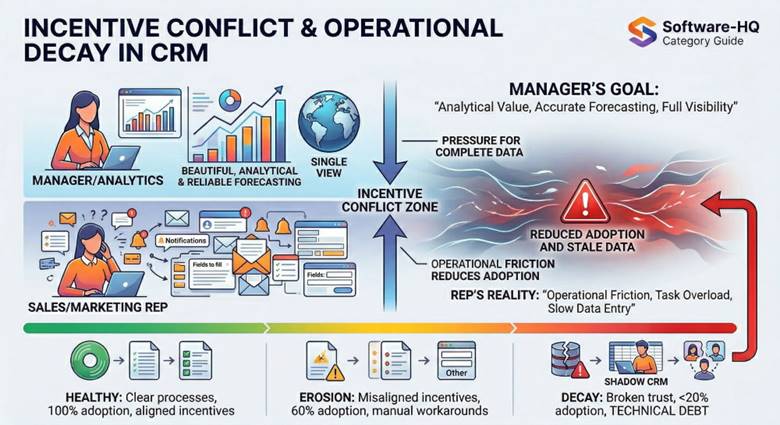
Incentive Misalignment (User vs System Conflict)
CRM systems often create a structural tension between:
- users who enter data
- managers who analyze it
Sales reps, for example, may experience CRM as:
- administrative overhead
- delayed value
- extra steps with no immediate benefit
Managers, on the other hand, depend on:
- complete data
- structured reporting
- consistent usage
This creates a common conflict:
the system provides analytical value upward, while creating operational friction downward
When this gap is not addressed, adoption declines even if the system is technically sound.
Shadow CRM Behavior
When formal CRM systems become difficult to use or trust, teams often create informal alternatives:
- private spreadsheets
- Slack threads
- personal notes
- disconnected tools
This behavior is often referred to as a “shadow CRM.”
It indicates that:
- the official system is not aligned with real workflows
- data is fragmenting again despite centralization
The presence of shadow systems is one of the clearest signs that CRM adoption has broken down at an operational level.
Why “Easy to Start” and “Hard to Operationalize” Can Both Be True
Many CRM products advertise quick setup. This is often true at the initial level. The gap between “set up” and “operationalized” is where difficulty hides. Operationalization includes defining consistent pipeline stages, configuring automation rules, establishing data entry standards, building integrations, training team members, and iterating on reports. This work grows as team size, integration count, and process complexity increase.
Why CRM Software Cannot Repair a Broken Business Strategy
CRM can standardize a process, expose where it breaks down, and coordinate handoffs. What it cannot do is fix a fundamentally flawed strategy, compensate for a product that doesn’t fit its market, or replace human relationship skills with software. CRM is an amplifier—it amplifies effective processes and also amplifies broken ones.
Technical Debt from Poor Implementation, Customization, or Governance
Over time, CRM environments can accumulate technical debt: unnecessary custom fields, contradictory automation rules, inconsistent pipeline stages, orphaned integrations, and overly complex permission structures. This debt increases maintenance cost, slows configuration work, and erodes trust. Governance matters from the start, not just after problems surface.
CRM Decay Signals (Trust Erosion Indicators)
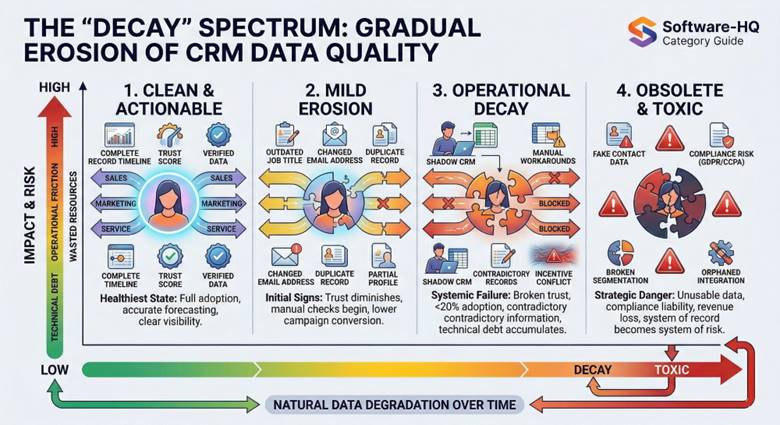
CRM systems rarely fail suddenly. They degrade gradually as trust in the system erodes. Common signals include:
- a growing percentage of contacts without recent activity
- increasing reliance on “Other” or undefined fields
- duplicate records becoming common
- pipeline stages losing consistent meaning
- reports requiring manual correction before use
When these signals appear, the system is still operational but no longer reliable. At that point, teams often begin to bypass it informally, even if it remains technically functional.
Trust, Corroboration, and Claim Boundaries
Not everything written about CRM software is equally reliable. Some statements are high-stability category facts. Others are volatile marketing claims.
Stable Category Facts
| High-Trust Baseline These facts are stable across sources, time, and vendor context: CRM stands for Customer Relationship Management. Core functions include contact management, lead management, and deal tracking. Most modern CRM products are SaaS-based. CRM centralizes fragmented customer data into a shared record environment. The category spans Sales, Marketing, and Service corridors. |
Volatile or Over-Marketed Claims to Treat Cautiously
| Claim Type | What Is Often Said | Why It’s Volatile |
| Revenue impact | “CRM increases revenue by X%” | Revenue depends on too many variables to isolate CRM’s effect. Often vendor-sponsored. |
| Universal necessity | “Every business needs CRM” | CRM is useful when shared visibility is a genuine need—not a universal requirement. |
| AI prediction | “AI-powered CRM predicts behavior with high accuracy” | AI features are evolving. Accuracy depends on data quality and use case. |
| Effortless ROI | “CRM pays for itself in months” | ROI depends on implementation quality, adoption, and process design. |
These are stability assessments, not rebuttals. Some claims may be true in specific contexts, but they are not stable enough to anchor a category definition.
AI Readiness and Data Requirements
AI features in CRM systems depend heavily on data quality and volume.
For AI-driven insights to be reliable, systems require:
- consistent data entry
- sufficient interaction history
- standardized fields and records
Without these conditions:
- predictions become unreliable
- recommendations lose accuracy
This is sometimes summarized as:
high-quality input is required for meaningful output
AI features can enhance CRM systems, but they do not compensate for weak data foundations.
What Software-HQ Is Qualified to Explain on This Page
Software-HQ provides software category education, reviews, comparisons, pricing analysis, and decision-support content. This page does not provide CRM implementation services, sales operations consulting, legal or financial advice, data compliance certification, or vendor-specific support documentation.
CRM Readiness and Expansion Triggers
Organizations typically expand CRM usage when coordination problems reach certain thresholds.
Common trigger events include:
- multiple team members interacting with the same customers
- inability to track deal status reliably
- loss of context between marketing, sales, and service
- increasing need for reporting and forecasting
Similarly, there are boundary triggers:
- when service complexity exceeds CRM capabilities
- when dedicated support systems become necessary
- when integration overhead becomes unsustainable
CRM adoption is not binary. It evolves in response to operational pressure.
How Software-HQ Approaches CRM Analysis
Software-HQ treats CRM software as a category system rather than a product list.
This means:
- focusing on how CRM works across data, processes, and teams
- analyzing tradeoffs rather than promoting specific tools
- distinguishing category behavior from vendor marketing
This page is designed to provide category clarity.
Product-level evaluation, comparison, and selection are handled in dedicated CRM corridors.
FAQ
What is CRM Software?
CRM software is a category of business software used to centralize customer and prospect information, track interactions across the customer lifecycle, and coordinate recurring workflows across sales, marketing, and service contexts. It typically functions as a shared system of record for relationship data.
What does CRM software actually do?
At its core, CRM software stores contact and account records in one shared database (data centralization), logs interactions like calls, emails, and meetings in chronological order (interaction tracking), and automates recurring steps like follow-up tasks and stage-based notifications (workflow automation).
Is CRM software only for sales teams?
No. While sales pipeline management is the most recognized CRM function, the category also covers marketing (lead scoring, campaign coordination, segmentation) and service (case management, interaction history, support continuity). How deeply each corridor is used depends on the product and organizational needs.
What is the difference between CRM and marketing automation?
CRM centralizes relationship records and interaction history. Marketing automation handles campaign orchestration, triggered messaging, and lead nurturing workflows. The two are compatible and often used together, but serve different primary functions.
What is the difference between CRM and ERP?
CRM centers on customer-facing relationships and workflows. ERP centers on back-office operations (finance, inventory, supply chain, HR). They often connect but manage different operational domains.
How does CRM software centralize customer data?
CRM stores contact records, account records, activity logs, deals, and support tickets in one shared database. This reduces fragmentation across personal spreadsheets, private inboxes, and disconnected note apps.
Why is interaction tracking a core CRM function?
Interaction tracking preserves a chronological record of every touchpoint attached to the relevant contact or account. This supports continuity across the customer lifecycle and helps team members pick up conversations with full prior context.
Can CRM software automate workflows?
Yes, most CRM platforms support workflow automation for recurring tasks. However, automation standardizes an existing process—it does not repair a broken one. Its usefulness depends on process consistency and team adoption.
What are the main types of CRM software?
CRM can be categorized by corridor (Sales, Marketing, Service), by logic layer (operational, analytical, collaborative), by verticality (general-purpose vs. niche), and by scale (entry-level vs. enterprise). These are overlapping frameworks, not rigid product types.
Is CRM software usually cloud-based?
Most modern CRM products are delivered through SaaS models. On-premise and hybrid deployments still exist but cloud delivery is predominant.
Can a small business use CRM software?
Yes. Many CRM products offer entry-level plans for small teams. CRM becomes useful when shared visibility, structured follow-up, or pipeline tracking outgrow spreadsheets and email.
What are the limits of CRM software?
CRM requires clean data, consistent adoption, and sound process design. It carries growing implementation complexity, cannot repair broken strategy, and can accumulate technical debt without governance.
Can CRM software fix a broken sales or service process?
No. CRM can standardize and expose process issues, but it does not independently repair them. CRM amplifies existing operational discipline—it does not replace it.
Why do CRM projects become difficult over time?
Complexity grows with users, custom fields, automations, integrations, and reporting. Without governance, systems accumulate technical debt that makes ongoing operationalization harder than initial setup.
How do organizations decide whether they need sales, marketing, or service CRM capabilities?
The decision depends on where the most pressing coordination problems are. Organizations typically start with one corridor and expand as needs evolve, rather than assuming equal priority across all three.
Explore CRM by Topic
To go deeper, explore specific areas of CRM:
- CRM selection → choosing tools based on use case
- CRM pricing → understanding cost structures and scaling
- CRM features → how core capabilities work
- CRM integrations → how CRM connects with other systems
- CRM operations → common issues and system behavior
- CRM types → classification and system variations
- CRM use cases → how CRM is used across teams